How to Turn Off Apple Watch (And Force Restart It)
Hold the side button, tap the small power icon in the corner, then drag the Power Off slider. Here is the full sequence, screen by screen, plus what to do when the watch is frozen.
Press and hold the side button until the sliders appear, tap the power icon in the top-right corner, then drag the Power Off slider to the right. Hold the side button again to turn the watch back on. You cannot shut an Apple Watch down while it is sitting on its charger.
People searching for how to turn off Apple Watch are usually stuck on the same step. They hold the side button, three sliders appear — Medical ID, Compass Backtrack, Emergency Call — and none of them switches the watch off.
The power control is the small icon in the top-right corner of that screen. Tap it and the Power Off slider replaces the list. That extra tap is the only part of this that is not obvious.
Take the watch off its charger first. Apple states you cannot restart an Apple Watch while it is charging, so the shutdown controls are no use until you disconnect it.
How to turn off Apple Watch with the side button
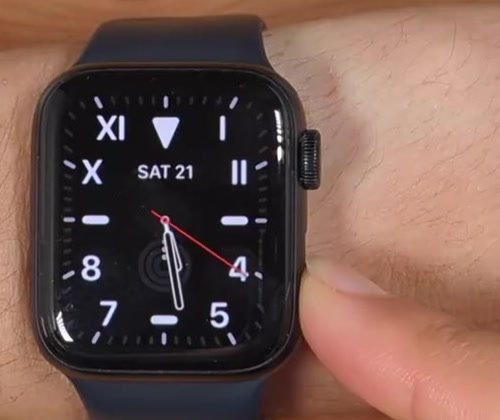
1. Press and hold the side button — the flat, oblong button below the Digital Crown, not the Crown itself. Keep holding for about two seconds.
2. Let go when the sliders appear. You will see Medical ID, Compass Backtrack and Emergency Call listed down the screen, with a small power icon in the top-right corner.
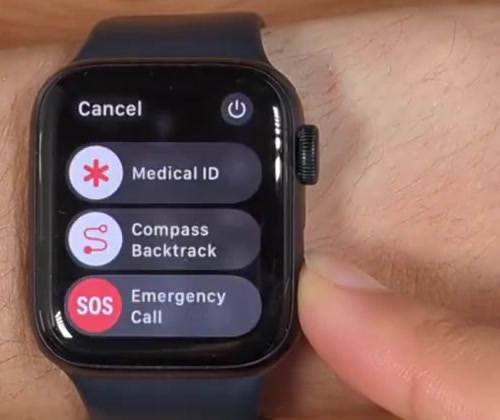
3. Tap the power icon in the top-right corner. This is the step most people miss, and it is why the screen looks like a dead end.
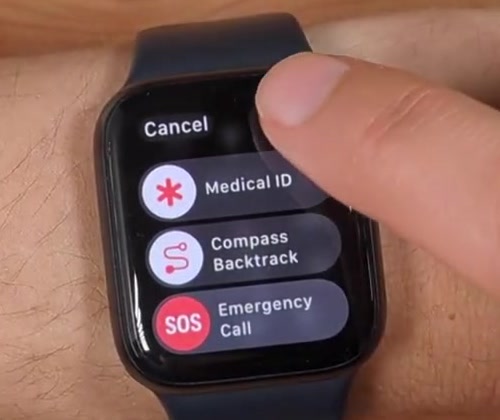
4. The Power Off slider appears near the bottom of the screen, with Cancel at the top if you change your mind.
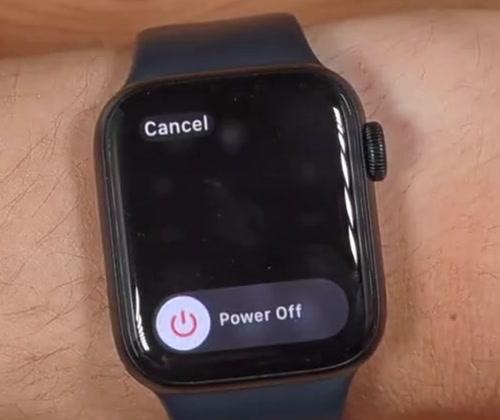
5. Drag the slider all the way to the right. Do not tap it — it only responds to a drag.
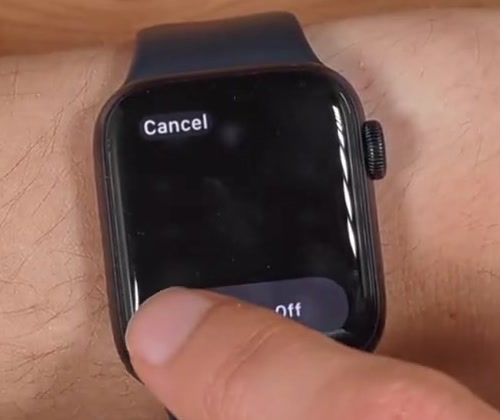
Wait until the display is completely black before you set the watch down. If it lights up again when you move your wrist, the shutdown did not take and you are still on the watch face.
Turning it back on
Hold the side button down until the Apple logo appears, then let go. Holding it briefly does nothing from a cold start, so give it a few seconds.
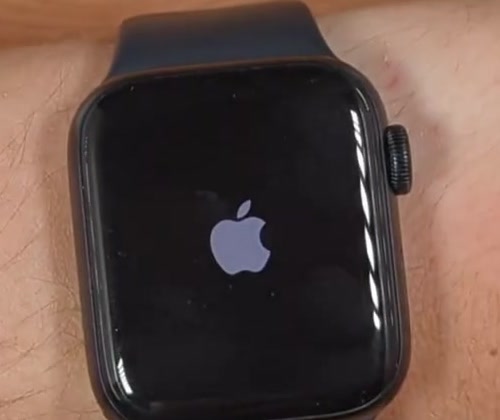
Startup takes noticeably longer than waking the screen, and the watch will normally ask for your passcode before it reconnects to your iPhone.
If the watch is frozen and will not respond
When the screen is stuck or the side button does nothing, you can force the hardware to restart: hold the side button and the Digital Crown at the same time for at least 10 seconds, until the Apple logo appears.
Apple is specific that this is a last resort — do it only when a normal restart is not possible. It cuts the software off mid-task rather than shutting it down cleanly, so it is not a substitute for the slider when the slider works.
What powering off does not do
It is not Low Power Mode. Low Power Mode keeps the watch running and usable — it switches off the always-on display and limits some background sensor readings, including background heart rate and blood oxygen. Powering off stops everything.
Power Reserve no longer exists. The old mode that stripped the watch back to a bare clock was replaced by Low Power Mode in watchOS 9, and there is no way to turn it on again on a current watch. If you remember Power Reserve as your half-way option, Low Power Mode is what took its place.
It does not unpair or erase anything. A shutdown is just a shutdown. Your data, watch faces and pairing are all intact when it starts back up. Unpairing from your iPhone is a separate action in the Watch app.
On Apple Watch Ultra, the Action button is not the power button. The orange Action button on the left-hand side runs whichever shortcut you have assigned to it. Shutdown still lives behind the side button on the right, exactly as above.
Common questions
Can I turn it off from my paired iPhone? Apple's documentation does not describe any way to power the watch down remotely. The Watch app on your iPhone can change settings and ping the watch to help you find it, but the shutdown itself has to happen on the watch.
Does it need to be off to charge? No. Charging works normally with the watch on, and in fact you cannot shut it down while it is on the charger anyway.
Will I lose anything by turning it off? No. Nothing is erased and nothing needs re-setting up. The only thing you lose is whatever the watch would have tracked while it was off — activity, workouts and sleep are not recorded during that window.
If you cannot find the power icon
Check the charger first, since the controls behave differently while the watch is charging. If the screen responds to taps but the sliders never appear at all, hold the side button for longer — a short press opens the Dock instead.
If nothing on screen responds, use the force restart above. And if the watch will not start after that, or the screen stays black with the button held down, it is worth contacting Apple Support rather than repeating the attempt.