How to Unpair Apple Watch From Old Phone (Even Without It)
Unpairing is what removes Activation Lock and backs the watch up, so it is the step that matters before a watch or a phone changes hands. Here is the route with the old iPhone, and the two routes without it.

Keep the watch and the old iPhone together, open the Apple Watch app, tap My Watch, then All Watches. Tap the info button beside the watch, tap Unpair Apple Watch, confirm, and enter your Apple Account password. That erases the watch, backs it up to the iPhone first, and switches off Activation Lock.
Unpairing is not the same as disconnecting. When you unpair your Apple Watch from your old phone, Apple erases the watch back to factory settings — and that is the point. It is the only route that also lifts Activation Lock, the thing that otherwise makes the watch useless to anybody but you.
So the order matters. Do it while you still have the old iPhone in your hand, before you trade the phone in or hand the watch on. Do it afterwards and you are down to two fallbacks, and only one of them clears the lock.
Before you start: the password and the backup
Apple asks for two things. You need your Apple Account password, because that is what disables Activation Lock, and you need the watch passcode if the watch prompts for it. There is no reset button or SIM tray on an Apple Watch — Apple is explicit that the holes in the case are for sound and, on Ultra models, water-depth readings, and that you should not push anything into them.
The backup happens on its own. Apple documents that unpairing backs the watch up to the paired iPhone first, so the latest data is saved before the erase. That backup covers watch faces, app settings, notification settings, Health and Fitness history and your synced music and photo album. It does not cover your watch passcode, your Apple Pay cards, Bluetooth pairings, or anything that lives in iCloud rather than on the watch, such as Messages and Voice Memos.
How to unpair Apple Watch from old phone in the Watch app
1. Keep the two devices close together, open the Apple Watch app on the old iPhone, tap the My Watch tab, then tap All Watches at the top.
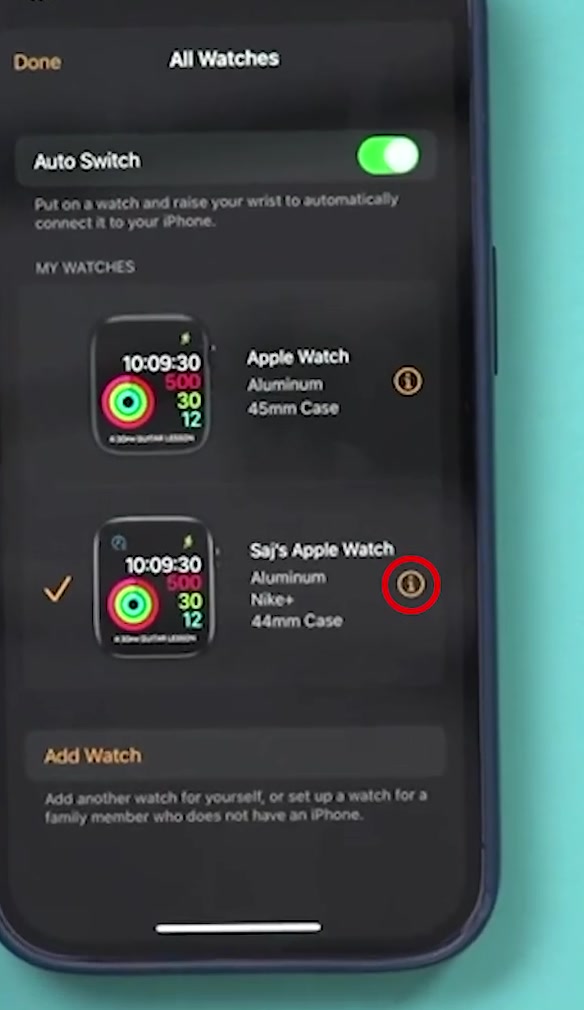
2. Tap the info button beside the watch you are removing, then scroll to the bottom and tap Unpair Apple Watch.
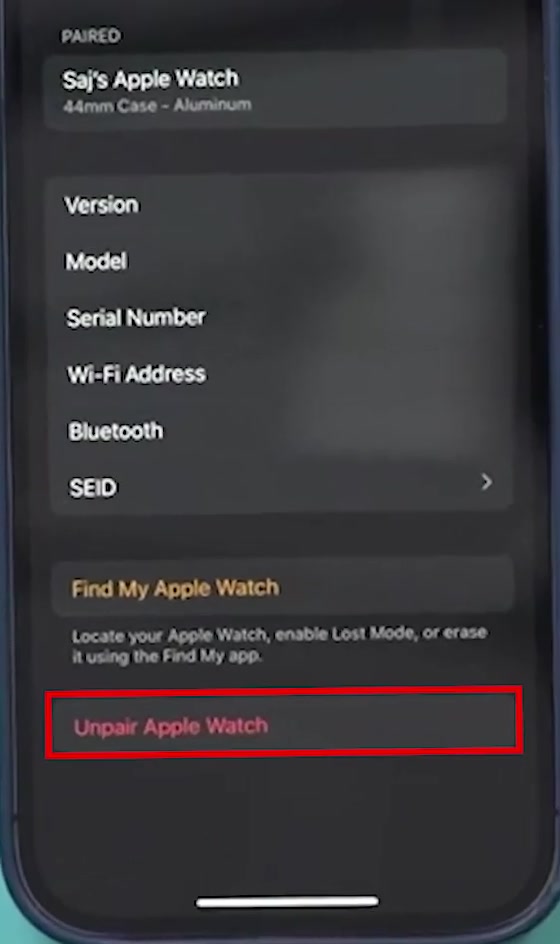
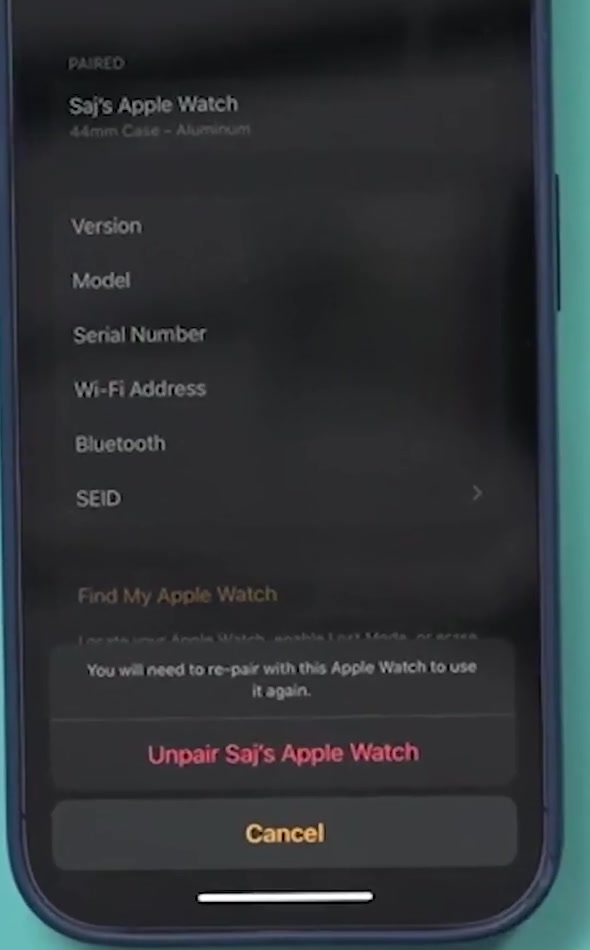
3. Confirm on the sheet that slides up. It names the watch and warns you will need to re-pair before you can use it again, which is accurate — the watch comes back as a blank device.
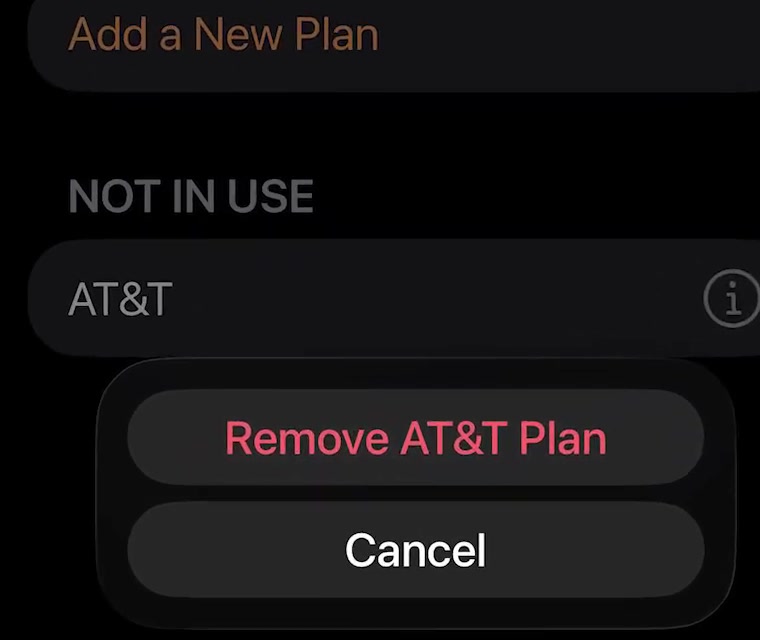
4. On a cellular model, decide what happens to the plan. Keep it if this watch is going onto another iPhone of yours. Remove it if the watch is being sold or given away — and note that removing the plan here is not the same as cancelling the subscription, which Apple says you have to arrange with your carrier.
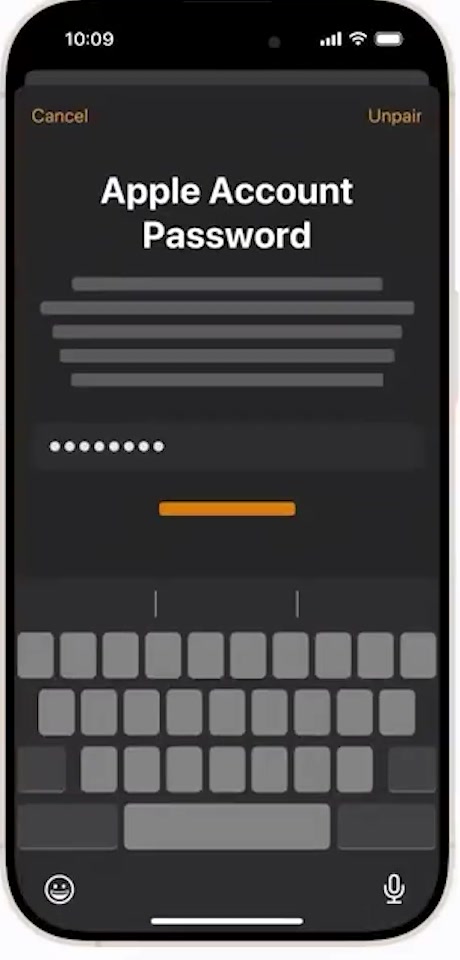
5. Enter your Apple Account password and tap Unpair. This is the step that turns Activation Lock off. Leave the watch and phone together until the watch restarts to its setup screen.
If you no longer have the old iPhone
There are two routes left, and they are not equivalent.
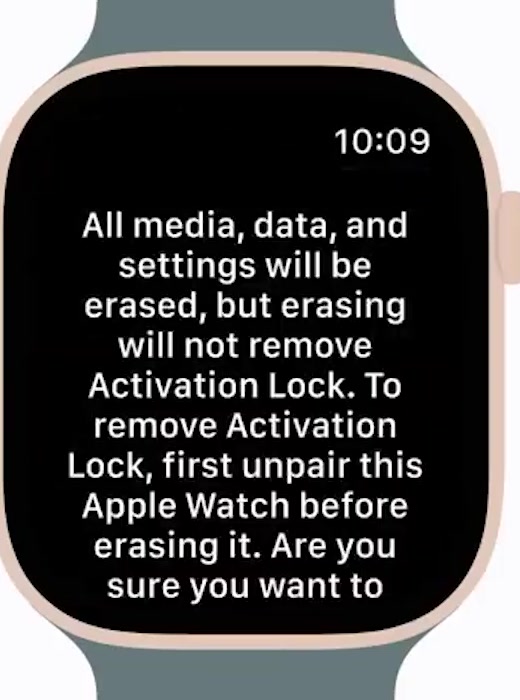
Erasing from the watch itself works without any phone: Settings, then General, then Reset, then Erase All Content and Settings. It wipes the watch but leaves Activation Lock in place. watchOS says so on screen before it begins, and it is worth reading rather than tapping through.
Erasing from the web is the one that clears the lock. Sign in at iCloud.com with the Apple Account the watch is signed in to, open Find My, pick the watch under All Devices, and choose Erase. Once the erase has gone through, a Remove button appears under the watch — use it, and confirm. That removal is what takes the watch off the account and lifts Activation Lock.
One caveat worth being straight about: the watch has to come online for a remote erase to land, and Apple's page on this does not put a time on it. Treat the watch as still locked until iCloud shows it gone from your device list, rather than assuming the instruction took.
What unpairing does not do
It does not just break the Bluetooth link. If you only want the watch to stop mirroring your notifications for a while, that is a different job — see our guide to disconnecting an Apple Watch from your iPhone, which leaves the pairing and your data alone.
It does not finish the move to a new handset. Unpairing is step one; setting the watch up again and restoring the backup is step two, and our walkthrough for pairing an Apple Watch to a new phone picks up from there.
It does not clear the lock on a watch signed in to somebody else's account. Activation Lock is tied to the Apple Account, not the phone, so a second-hand watch still asking for a password needs the previous owner to remove it from their account — nobody else can.
Common questions
Is there a way to unpair Apple Watch from old phone without the Apple Account password? No. Apple states plainly that the account email or phone number and password are required before anyone can unpair the watch, pair it with a new iPhone, or switch Find My off. If you have forgotten it, resetting the password is the route, not a workaround.
Do I need the old iPhone switched on and nearby? Yes, for the proper route. Apple's first instruction is to keep the watch and iPhone close together, because the backup runs between the two devices before the erase.
Will I lose my Health and Fitness data? Not if you restore the backup onto the next iPhone. Apple lists Health and Fitness history, awards and calibration data in the backup, though it notes you need iCloud or an encrypted computer backup for the health data to carry across.
Is the cellular plan gone for good if I remove it? Removing the plan takes it off the watch. Whether you are still being billed is a question for your carrier — Apple points you at them to cancel the subscription itself.
If Unpair Apple Watch isn't there
The button lives at the bottom of the watch's info screen, below the Find My Apple Watch block, so it is usually a scrolling problem rather than a missing option. Check you tapped the info button next to the right watch on the All Watches screen, not the watch row itself.
If the watch will not appear in the list at all, it is not currently paired to that iPhone, and the web route above is the one to use. If it appears but the unpair fails partway, Apple Support can confirm whether the watch is still held by an account you no longer control.