How to Delete Roblox Account (And What You Lose)
Roblox hides account deletion under its privacy settings, not Account Info. Here is the exact path, what the confirmation warns, and the support route if you are locked out.
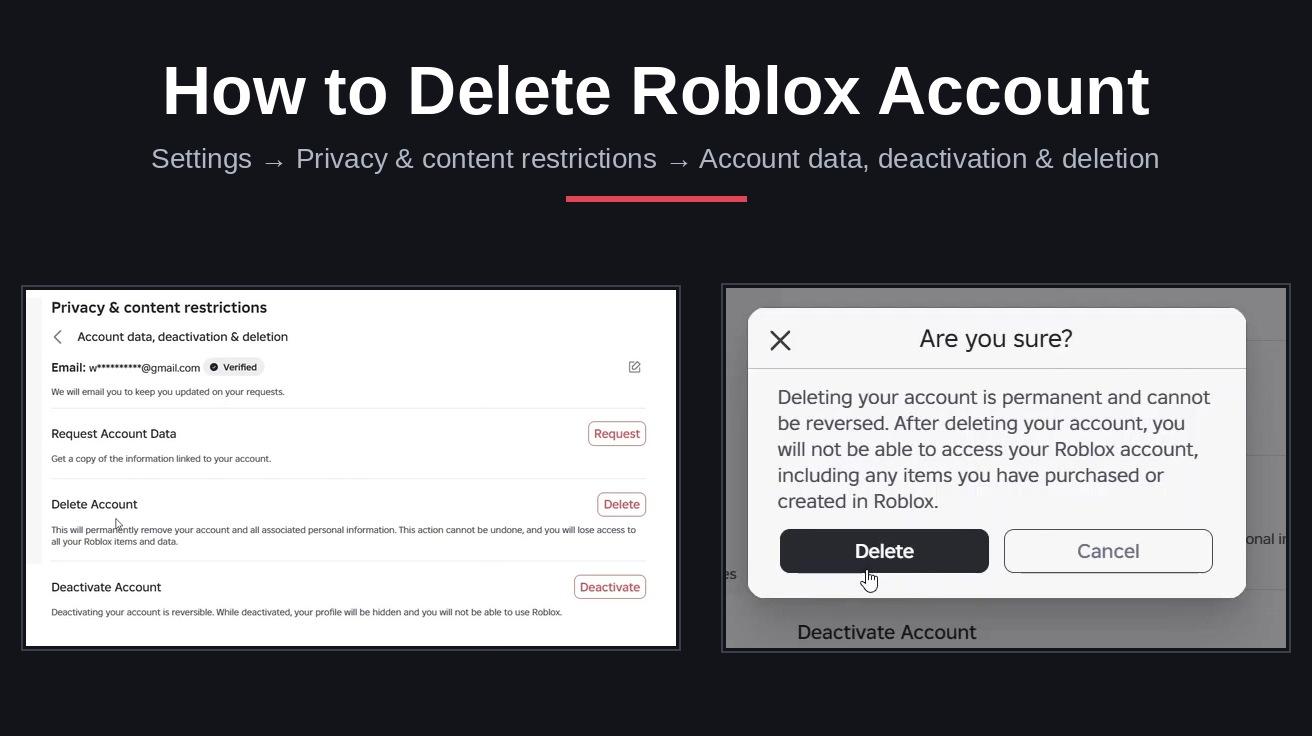
Sign in on the Roblox website, open Settings from the account menu, choose Privacy & content restrictions, then open Account data, deactivation & deletion and click Delete next to Delete Account. You need a verified email on the account, and Roblox warns on screen that the deletion is permanent and cannot be reversed.
Roblox lets you delete your Roblox account yourself, from a browser, without filing a support ticket. The control is not on the main account page, which is why most people never find it: it sits under the privacy settings rather than under Account Info.
It is worth being clear about what the button does before you press it. Roblox treats deletion as final, and the confirmation dialog says so in plain language. If you only want a break, there is a separate Deactivate option on the same screen that you can undo by signing back in.
How to delete Roblox account from a browser
Do this on a computer browser at roblox.com. The deletion controls are part of the website settings, not the Roblox app you launch games from.
1. Sign in at roblox.com, click your username or the gear icon in the top-right corner, then choose Settings.
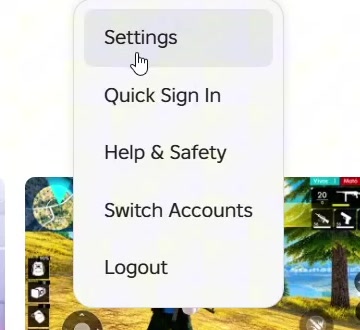
2. In the Settings sidebar, select Privacy & content restrictions. Scroll to the bottom of that list and click Account data, deactivation & deletion.
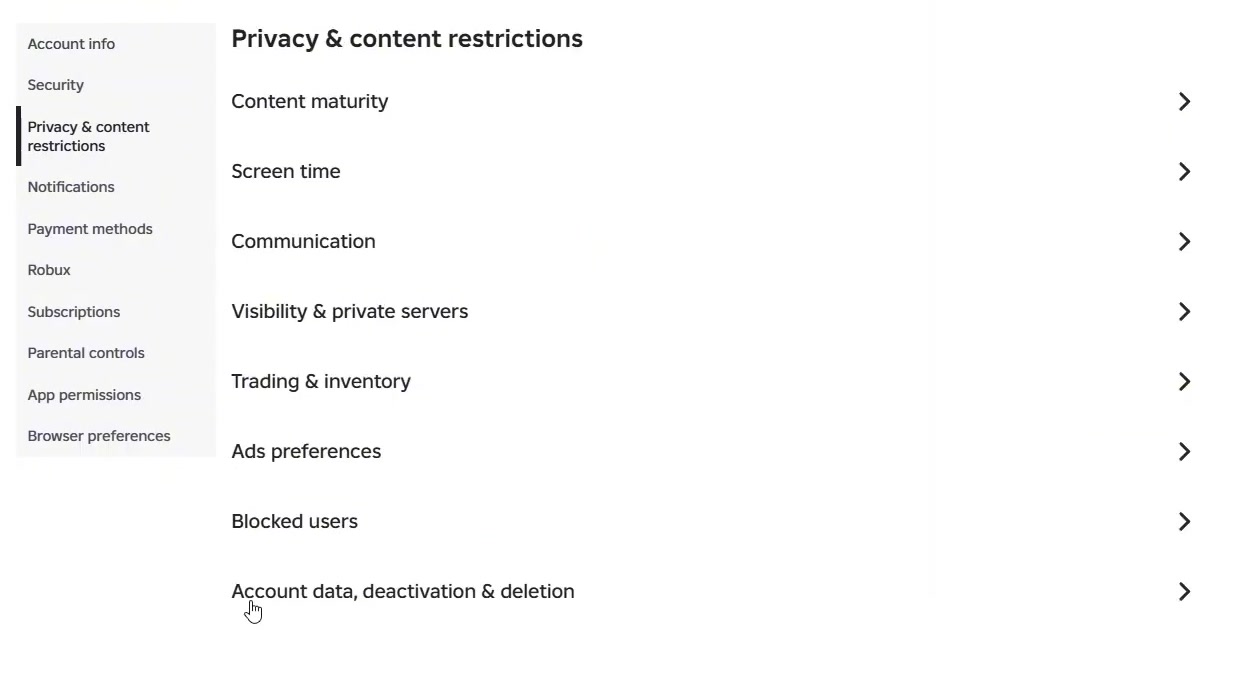
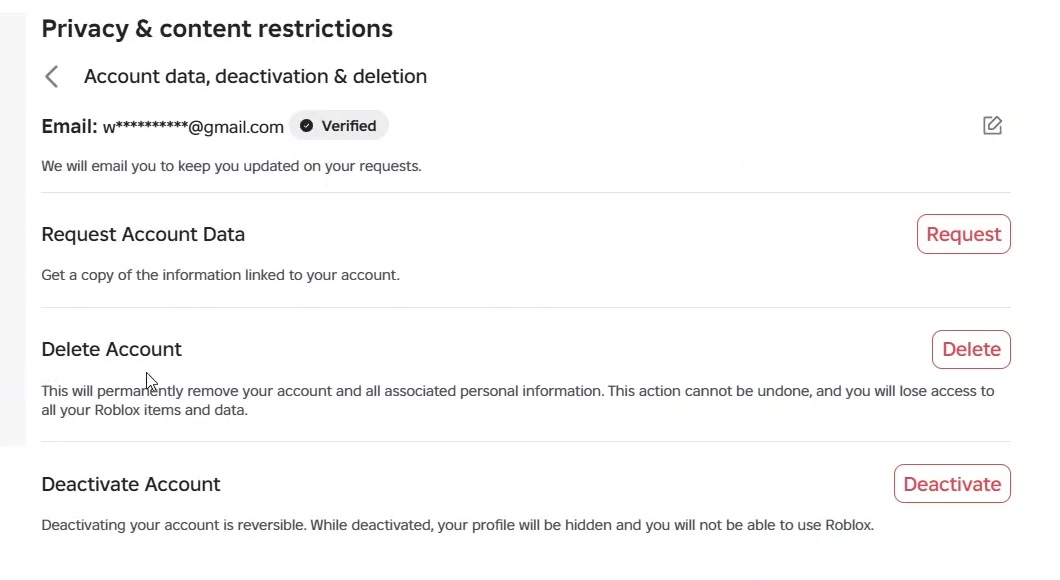
3. Check the Email line at the top of this screen. It should show a Verified badge. Then click Delete next to Delete Account.
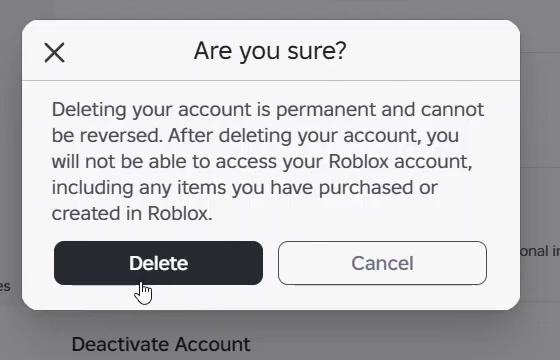
4. Read the Are you sure? dialog and click Delete to confirm, or Cancel to back out. Roblox may then ask you to confirm your identity by email.
Deactivate instead, if you might come back
The same screen offers Deactivate Account. Roblox describes it as reversible: your profile is hidden and you cannot use Roblox while it is off, but signing in again brings the account back. Nothing is erased.
Deleting is the opposite. Roblox's own description of Delete Account says it permanently removes your account and all associated personal information, that the action cannot be undone, and that you will lose access to all your Roblox items and data.
If you cannot sign in to your Roblox account
The self-serve button only appears to someone who is signed in with a verified email. If you are locked out, or the account belongs to a child you manage, the route is a privacy request instead.
Go to roblox.com/support, choose Data Privacy Requests as the help category, and then pick the Right to Be Forgotten option. You will be asked for the username and the email on the account so Roblox can verify ownership before it acts. Roblox does not publish a turnaround time for these requests.
What deleting your Roblox account does not do
It does not cancel billing on its own. If you pay for Roblox Premium through the Apple App Store or Google Play, that subscription is managed by the store, not by Roblox, so cancel it there first or it can keep renewing.
It does not remove the Roblox app from your devices. That is a separate cleanup on each phone, tablet or computer — see our guides on how to uninstall apps on iPhone and how to remove an application from Android.
It does not convert anything you own back into money. Robux, limited items and game passes are tied to the account, and Roblox does not offer a way to transfer them out before deletion.
Common questions
Can I get my Roblox account back after deleting it? Roblox's confirmation dialog states that deletion is permanent and cannot be reversed. Some third-party guides describe a recovery window, but Roblox does not state one on the deletion screen, so plan on the account being gone.
What happens to groups I own? Roblox does not spell this out on the deletion screen. If you own a community that other people rely on, transfer ownership to another member before you delete, rather than finding out afterwards.
Will my username become free for someone else? Roblox does not publish a rule about this on the deletion screen, and guidance elsewhere disagrees. Treat the username as unavailable to you once the account is gone.
If the Delete option is not there
Two things usually explain a missing or unusable button. The first is an unverified email: add and verify an address under Settings, then reload the deletion screen. The second is the device — the option lives in the website settings, so open roblox.com in a browser rather than looking inside the game app.
If the Roblox account is managed by a parent, or it is a child's account you cannot sign in to, use the support request route above rather than hunting for a button that will not appear.