How to Unarchive a Story on Instagram (Reshare It)
Instagram never built an Unarchive button for stories. What you actually do is open your Stories archive and reshare the story, which sends it out with a fresh 24-hour clock.
Instagram has no Unarchive button for stories. Open your profile, tap the menu at the top right, choose Archive, switch the dropdown to Stories archive, tap the story, tap More, and choose Reshare archived story. It goes back out as a brand-new story with a fresh 24-hour clock.
That is the whole of how to unarchive a story on Instagram, and the reason it feels harder than it is comes down to wording. Posts have a real Unarchive action that drops them back onto your grid in their original spot. Stories do not.
A story lives for 24 hours and then falls into a private archive that only you can see. Bringing one back means publishing it again, not restoring it. Worth knowing before you tap: your followers see it as new, and the original view count does not travel with it.
How to unarchive a story on Instagram in six taps
1. Open Instagram and tap your profile picture in the bottom-right corner to reach your profile.
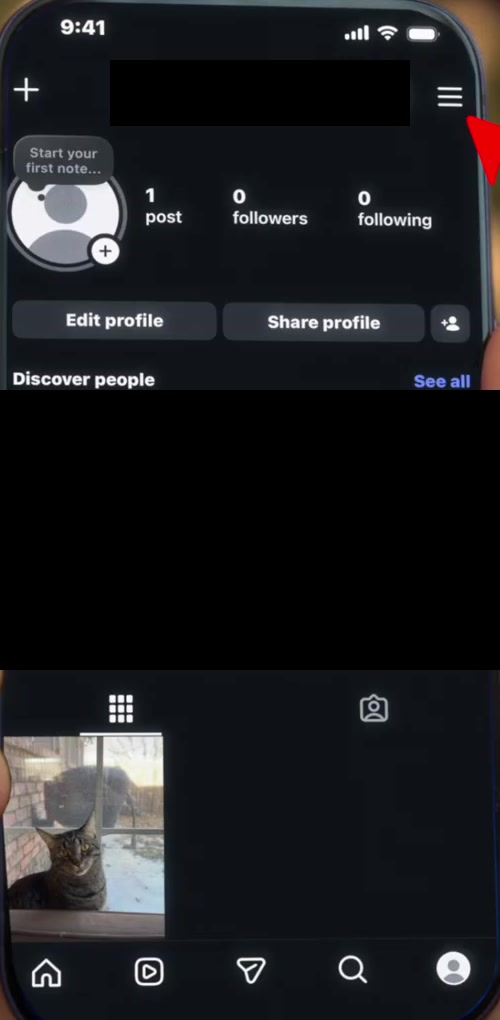
2. Tap the three horizontal lines at the top right.
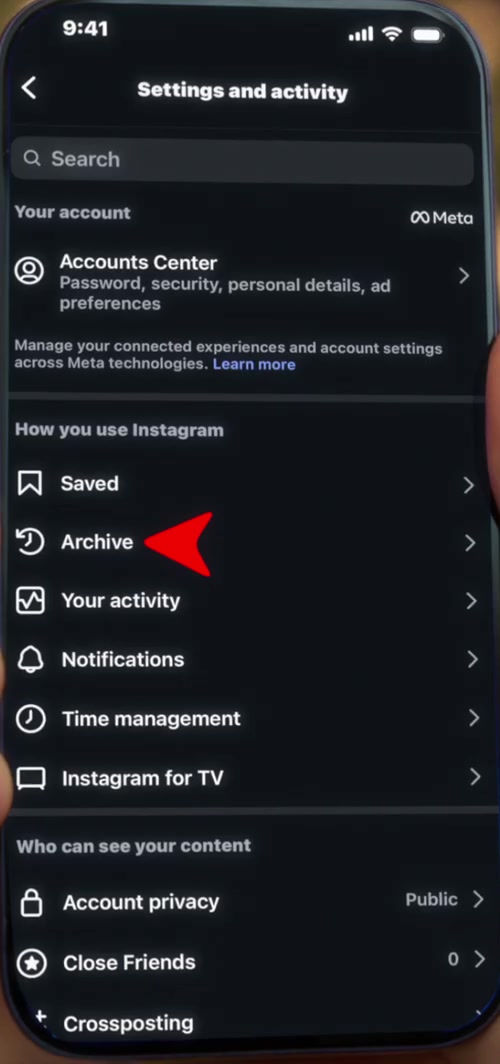
3. The Settings and activity screen opens. Under How you use Instagram, tap Archive.
4. Tap the dropdown at the top of the screen and choose Stories archive. Instagram often opens on Posts archive instead, which is the single most common reason people think their stories have vanished.
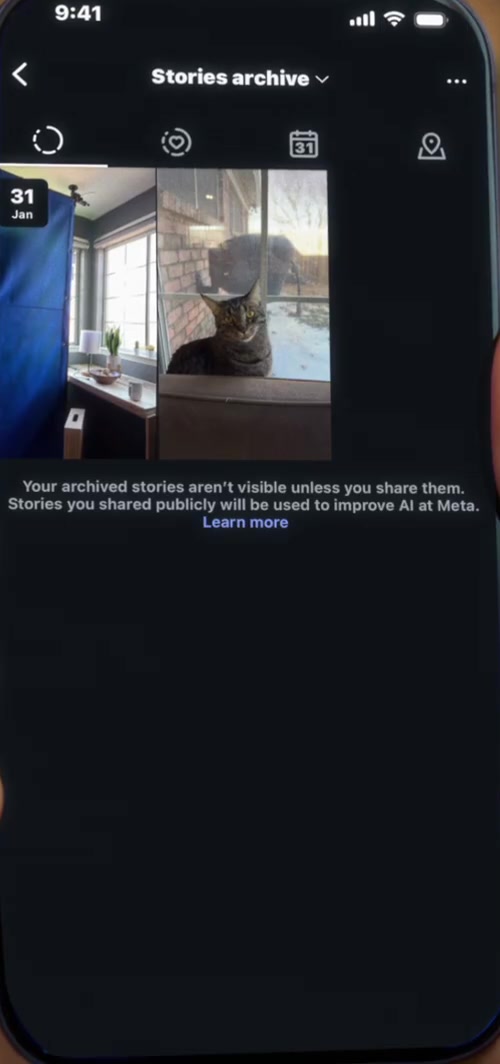
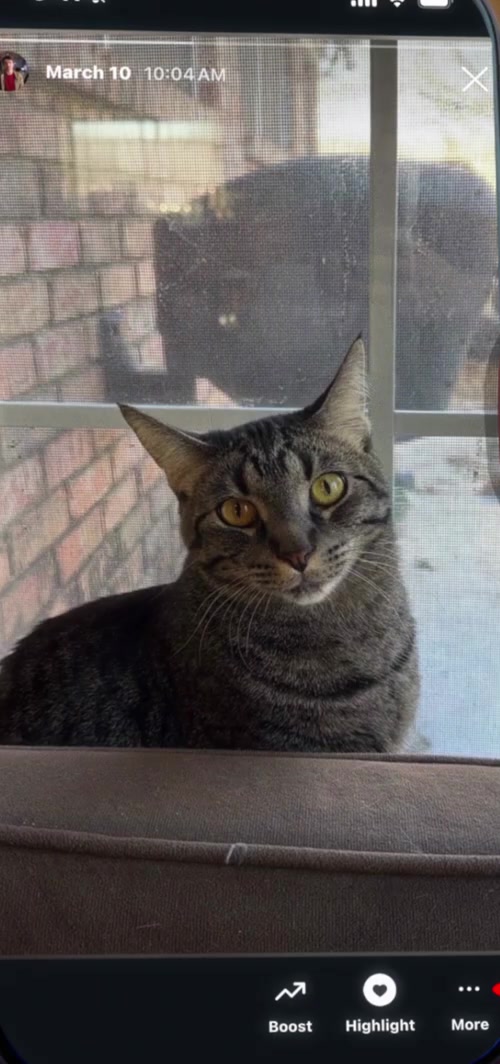
5. Tap the story you want, then tap More at the bottom right.
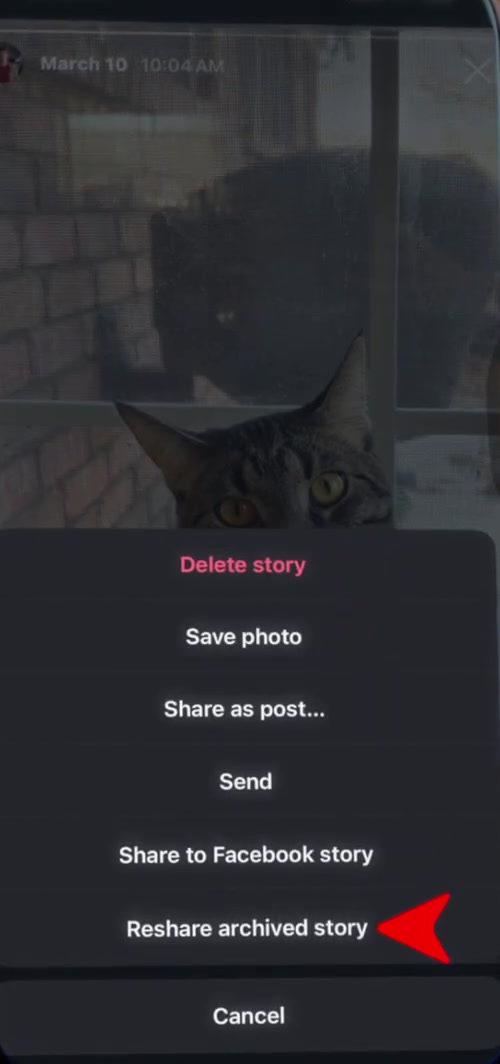
6. Choose Reshare archived story, then pick your audience on the Share sheet and tap Share.
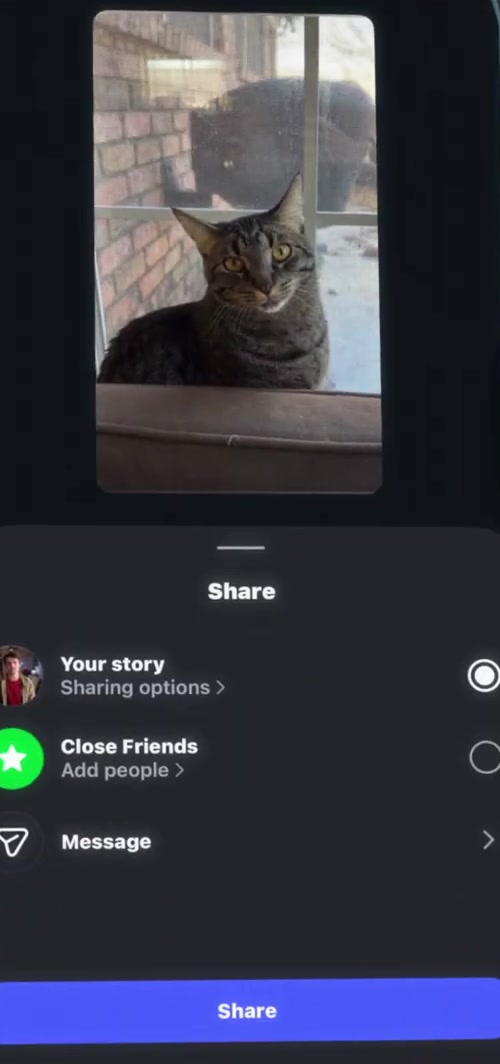
It publishes immediately. Instagram does not label it as a reshare or flag it as old, so nobody scrolling their story bar can tell the difference between this and something you shot five minutes ago.
The other two ways out of the archive
Resharing is not always what you want. From the same archived story you can also tap Highlight to pin it to your profile permanently. That route does not push anything into your followers' story bar, which makes it the quieter option if you are rebuilding a Highlight rather than announcing something.
Save photo pulls the original file to your camera roll. Use that when the story needs editing before it goes back out, which is usually the case with anything carrying a date, a price or an offer that has since moved on.
The steps above are from the iPhone app. Android is identical apart from the icon styling. The desktop site at instagram.com does not expose the Stories archive at all, so this one has to be done on your phone.
What resharing does not do
It does not resume the original 24 hours. The reshared story starts its own countdown from the moment you post it.
It does not carry over the view count. Your archive keeps the original views and replies attached to the original story, but the version your followers see is counted from zero. If you are resharing something to an audience that has grown, that is arguably the point.
It also does not change who can see your account. The Share sheet lets you narrow a reshare to Close Friends, but that is a per-story choice, not an account setting. Restricting your whole profile is a separate job, covered in making your Instagram account private.
Common questions
Can I unarchive a story I archived by accident, before the 24 hours were up? Yes, and the steps are the same. Archiving a live story pulls it from your followers' feeds straight away but deletes nothing. Resharing it restarts the clock rather than resuming it, so a story archived at hour 20 comes back with a full 24 hours ahead of it.
Why is my Stories archive empty? Auto-archiving is a setting, and if it was switched off, stories were deleted at the 24-hour mark rather than saved. Turn it on under Settings and privacy, then Archiving and downloading, then Save story to archive. Older stories that were never archived cannot be recovered. Instagram's own documentation does not describe any recovery path for them, and neither do we.
Can anyone see my archived stories before I reshare them? No. Instagram states plainly that only you can see your archived stories. They become visible again the moment you reshare one or add it to a Highlight, and not before. Mentions and tags in the story behave as they did originally, so anyone you tagged in the story gets notified again when it reposts.
If the option isn't there
If you see Share as post but no Reshare archived story, the app build is out of date. Update Instagram from the App Store or Play Store and reopen the archive. The labels on this menu have moved around more than once.
If Archive is missing from Settings and activity entirely, check that you are on your own profile rather than a business account you manage through another login, and that the app has finished updating. Failing that, Instagram's Help Centre is the escalation point; there is no web fallback for the Stories archive.