How to Download Movies on Netflix (Phone and Tablet)
Netflix downloads are an app feature, not an account feature. Here is where the Download button lives, how many titles your plan allows, and what offline playback will not do.
 By Daniel ShuttleworthOct 11, 2026
To download movies on Netflix, open the app on a phone or tablet, find the film, and tap Download on its title page. The download appears under My Netflix in the Downloads row and plays with no connection. This is an app feature only — there is no download button in a web browser.
Two things are worth knowing before you tap anything. The first is that offline playback is tied to the app, not to your account. Netflix lists Android phones and tablets, iPhone, iPad, Amazon Fire tablets and Chromebooks with the Google Play Store as the devices that can download titles. A laptop browser is not on that list.
The second is that your plan sets a ceiling. Ad-free plans allow up to 100 active downloads per device. Plans with ads allow 15 downloads per device per calendar month across two devices, and the count resets on the first of the month.
Where to download movies on Netflix in the app
Update the Netflix app first if you have not opened it in a while. Netflix notes that older app and operating system versions may not support downloads at all.
1. Open the Netflix app and make sure you are signed in on the profile you want the download attached to.
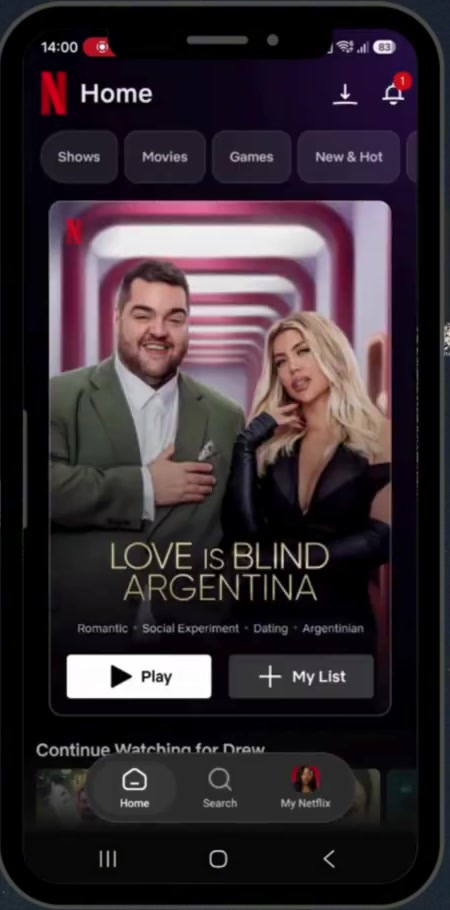
2. Find the movie. Tap Search if you know the title, or browse a category. Not every title can be downloaded, so the quickest test is simply to open it and look.
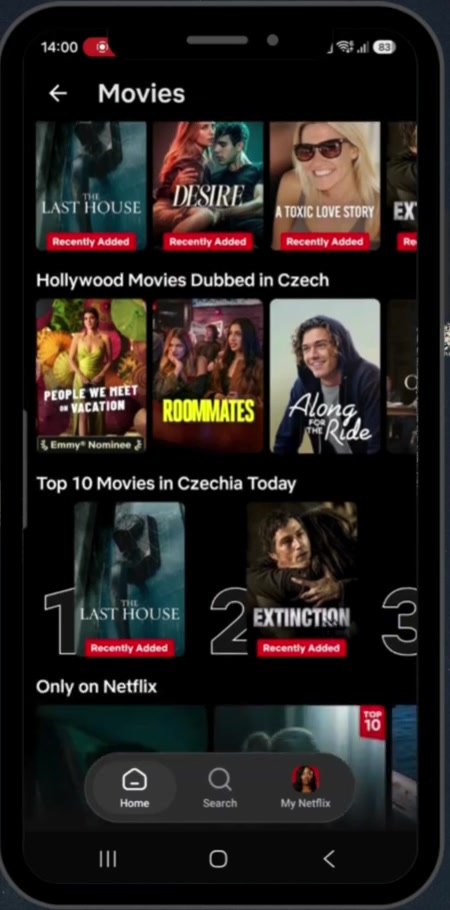
3. Open the title and tap Download, directly under the Play button. For a TV show you tap the download icon beside an individual episode instead, or Download Season to take the whole run.
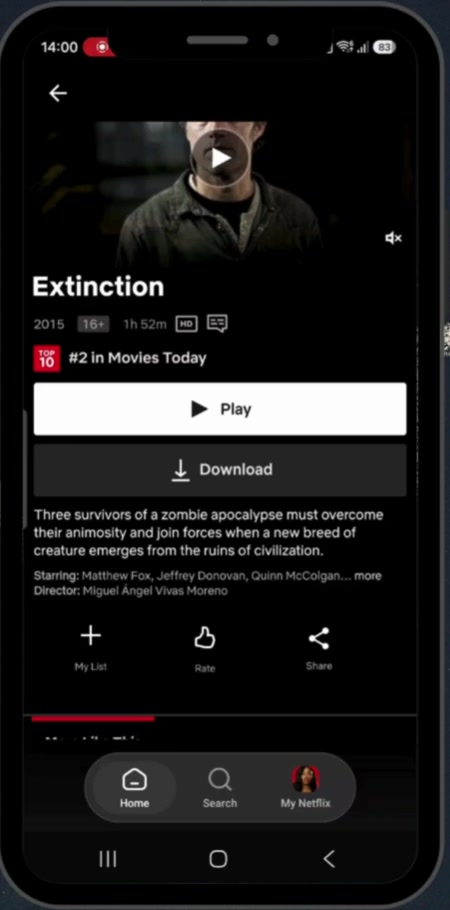
4. Tap My Netflix in the bottom right, then the Downloads row at the top. Everything you have saved on this device is listed there, and tapping Play starts it with no connection.
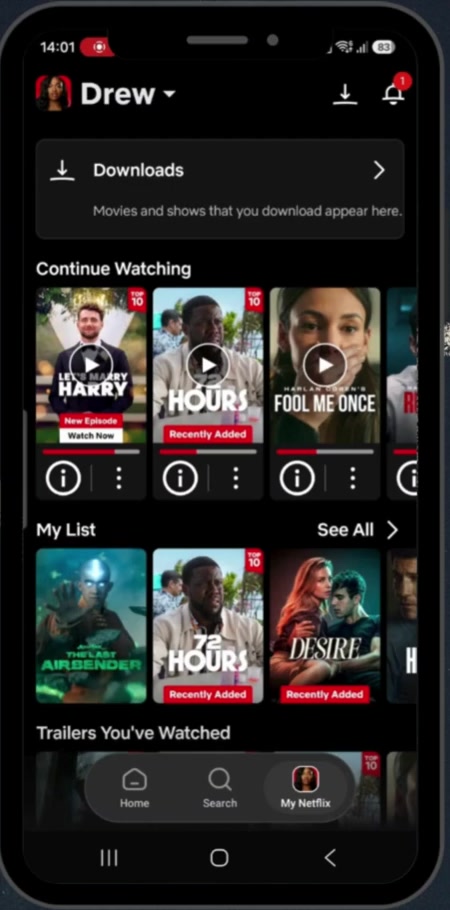
Faster routes and platform differences
If you want to browse only what is downloadable, open the Downloads screen and use the button at the bottom. The Android app labels it Find More to Download; Netflix's own help page calls the same thing See What You Can Download, so expect the wording to vary with your app version rather than assuming you are in the wrong place.
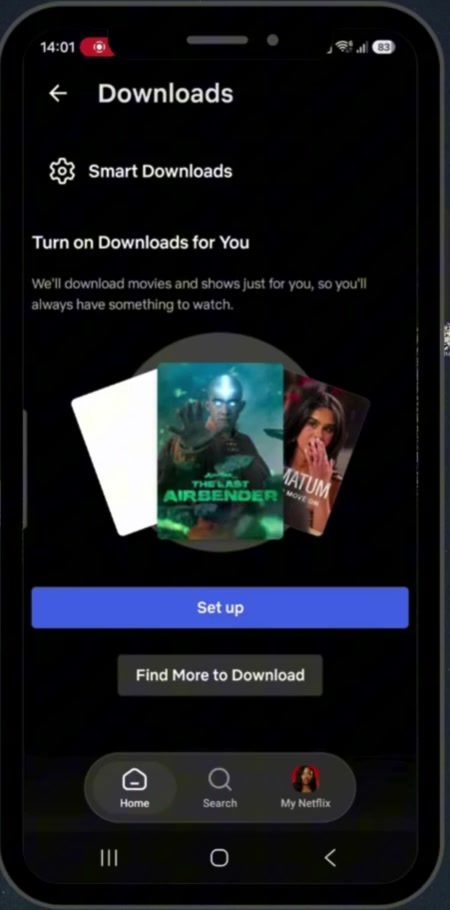
Netflix can also pick downloads for you. On iPhone, iPad and Android, tap My Netflix, then your profile name at the top, then App Settings, then Smart Downloads under Downloads, and turn on Downloads for You. It downloads over Wi-Fi only, you set a storage allowance in gigabytes per profile, and it is not offered on ad-supported plans.
On a Chromebook the route is the same with different wording: open Downloads, then Find More to Download.
What downloading does not do
It does not give you a movie file. The download plays inside the Netflix app, on the device that fetched it, and you need to stay signed in to watch it. It cannot be copied to another phone, loaded onto a USB stick or opened in another player.
It is also not permanent. Netflix says downloaded titles expire after a certain amount of time but does not publish how long that is, and a title that has gone shows Expired. The fix is to delete the download and fetch it again. Some titles additionally cap how many times a single account can download them in a year, which is what the message about a title being downloadable one more time refers to.
And it does not survive cancelling. If your membership ends, downloads on the device are deleted, and restarting the membership means downloading them again.
Common questions
Can another profile watch what I downloaded? Yes. Downloads stay on the device that fetched them and can be played from any profile on the account. Kids profiles are the exception — a downloaded title with a higher maturity rating may not appear there offline.
Will downloading burn through my mobile data? It can, which is why Netflix suggests connecting to Wi-Fi before you start. Downloads for You only ever runs on Wi-Fi.
How much space does a movie take? Netflix does not publish per-title sizes, and they vary with length and quality, so the practical answer is to watch your free space rather than a number. If your phone is already tight, our guide to getting more storage on iPhone covers the usual culprits, and clearing cache on iPhone deals with the apps that quietly grow.
If the Download button isn't there
Check what you are holding first. On a Windows or Mac browser there is no download button to find, and the same is true on a TV or streaming stick — the feature exists only in the phone, tablet, Fire tablet and Chromebook apps.
If you are in the app and the button is still missing, update the app and the operating system, then confirm the title itself is downloadable by opening the Downloads screen and browsing from there. If you get Download Max Reached instead, you have hit your plan's limit: wait for the monthly reset on an ad-supported plan, remove downloads you have finished, or stream the title instead. On an iPhone, a download that reports itself as expired the moment it arrives usually means the device clock is wrong — set date and time to update automatically, then delete and re-download.